Dredge the sales pipeline - CRM Leads Management
- 2021年6月18日
- 讀畢需時 4 分鐘
已更新:2023年12月8日
1.5X faster conversion, +15% leads assign rate, 3X faster allocations, 4X feature usage
---
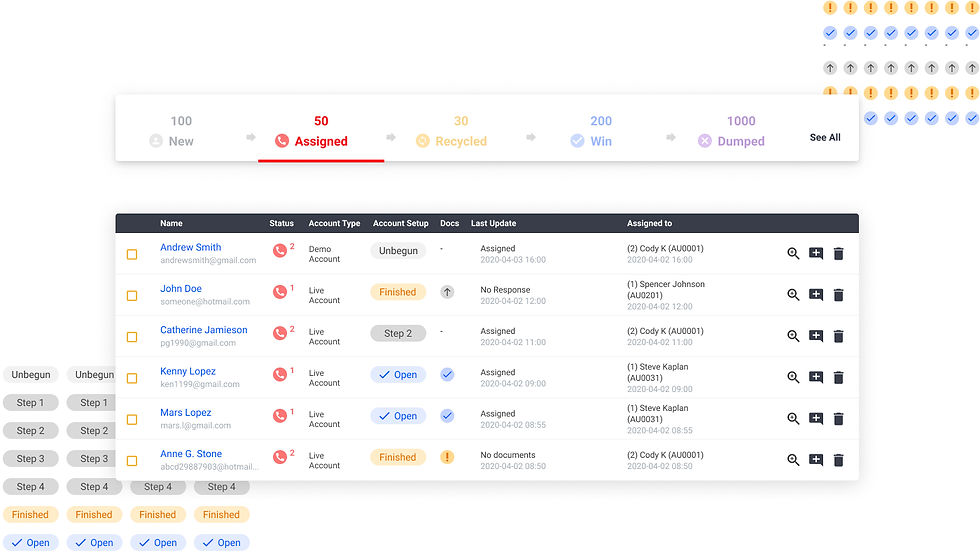
Date: 2020-2021
Role: End-to-end UX Designer
Type: Responsive Web Application (Desktop & Mobile)
The leads management system is an internal tool for the sales team to nurture and convert potential signups/contacts into clients (open a trading account).
The system has 2 major user groups:
Sales Managers: Find and assign potential leads to salespeople (Full authority)
Salespeople: Nurture assigned leads until conversion

Stakeholders: “We want a full redesign with these features.” Is it that simple?
When I joined the IT team as the first designer, I realized that the team has been taking very specific feature-level requests from the stakeholders and jumping into development right away. Take the leads system redesign as an example:
"Please add a "Referal" filter, "Country" filter, a "Recycled" filter, and a "Date" filter in the new design. " - The major stakeholders/users of the leads system redesign project
The feature-level request seems straightforward and easy to implement. However, will that solve the problems users encountered with the current system? What is the need behind the request? I took a step forward to seek the answer because my real goal is to solve the problem and help the users, not just build the features.
Why do users want so many filters? Find the underlying needs with interviews + walkthroughs
Why do users want so many filters? Do we have complicated categories of leads? (No. ) Do we have a huge number of signups that need to be filtered into manageable numbers? (No.) Then why? After studying the system and user tasks, I identified the actual problem as:
Define the problem:

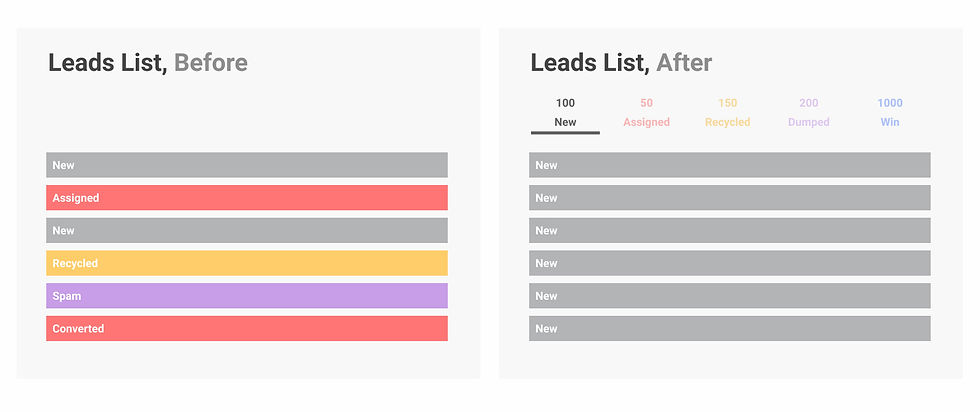
It was difficult to distinguish leads that need attention from a long, mixed list.
All leads are in the same list that includes spam, unqualified leads, and leads that have already been taken care of.
Moreover, it's also hard to tell how far the leads are from the final goal or to know the latest update about the leads, making it difficult to prioritize high-potential leads and take proper actions.
The frustration of being flooded by useless or dated leads in the list made users think of the easiest solution: filters. It reveals the underlying problem.
I wonder: Is there a way to help users find potential leads easier other than tedious manual filtering?
My Design Solution Overview
(Sales manager's view - there's also salesperson's view which focuses on tracking assigned and closed leads)
*The UI design of the project is made within the old design system. 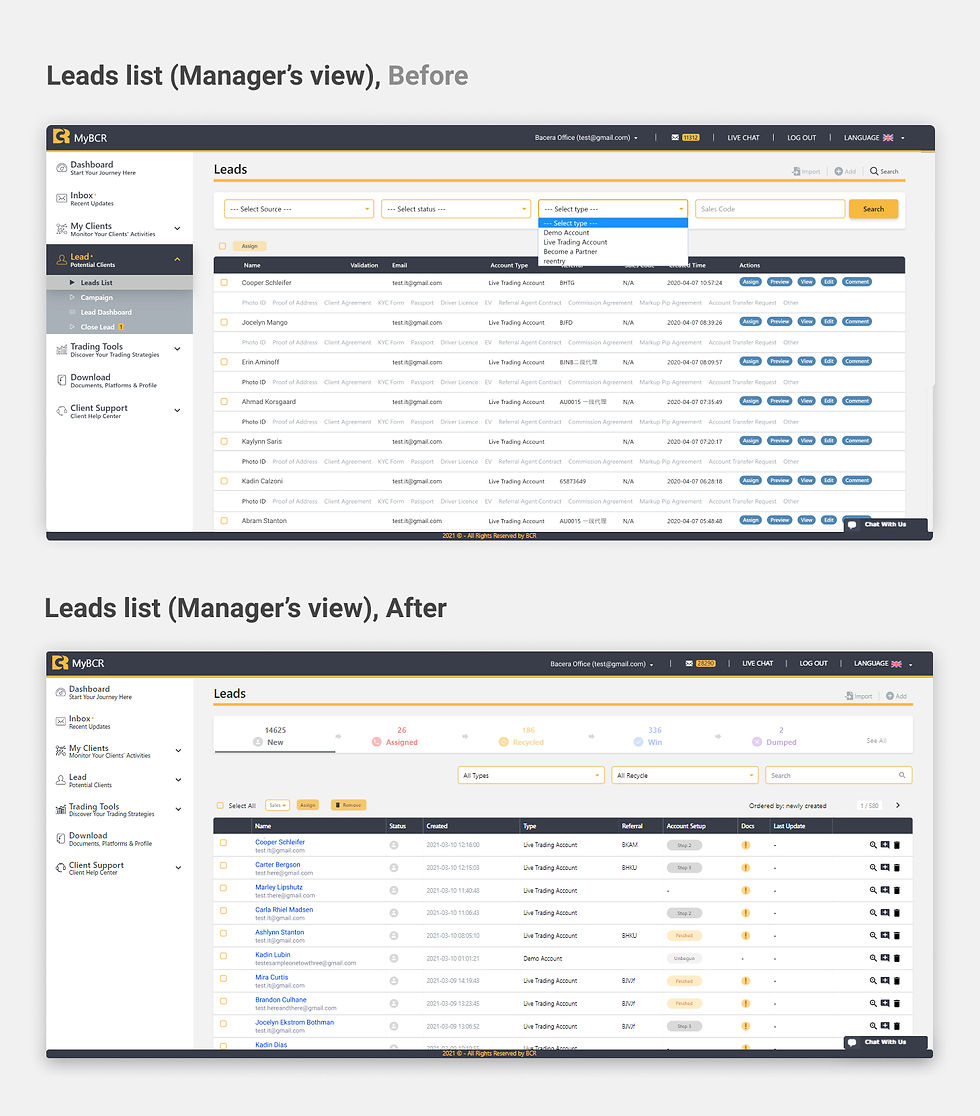
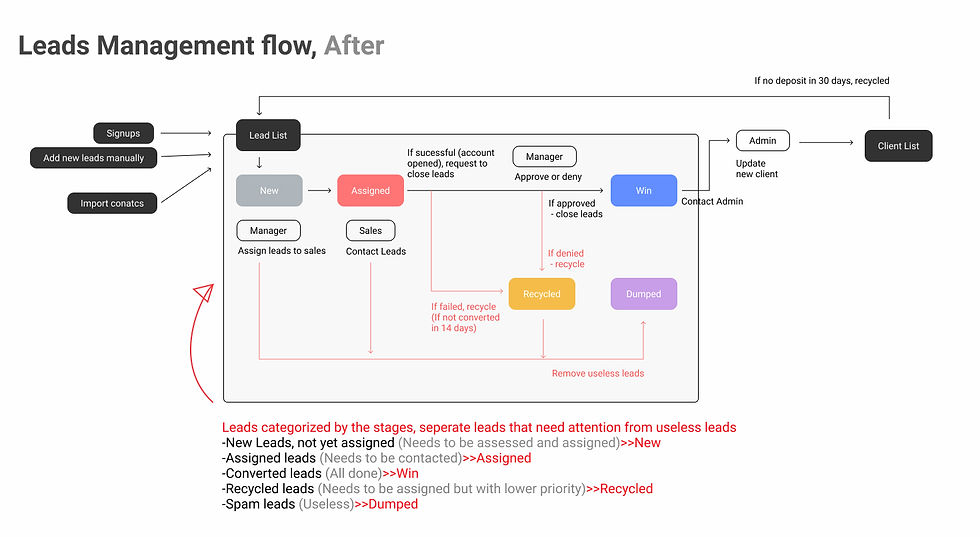
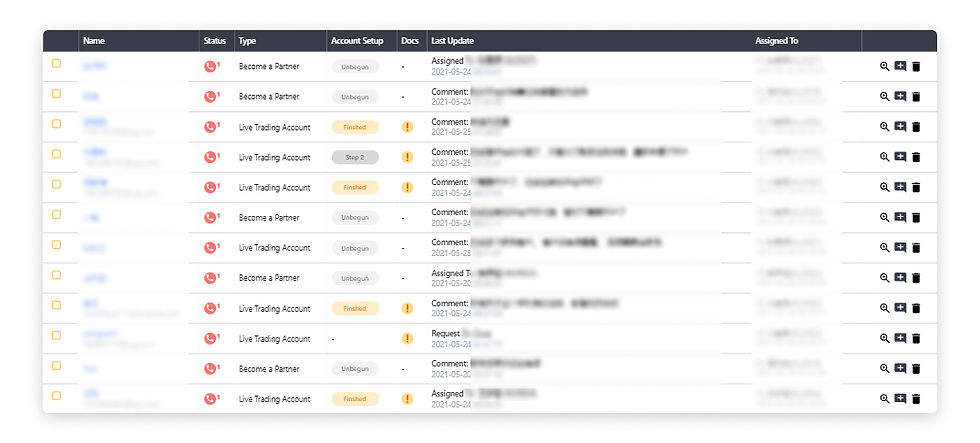
1. Separate leads by status using tabs; visualize the leads pipeline
2. Color-coded progress labels and milestones allow the salespeople or managers to find high-priority leads and respond to them.
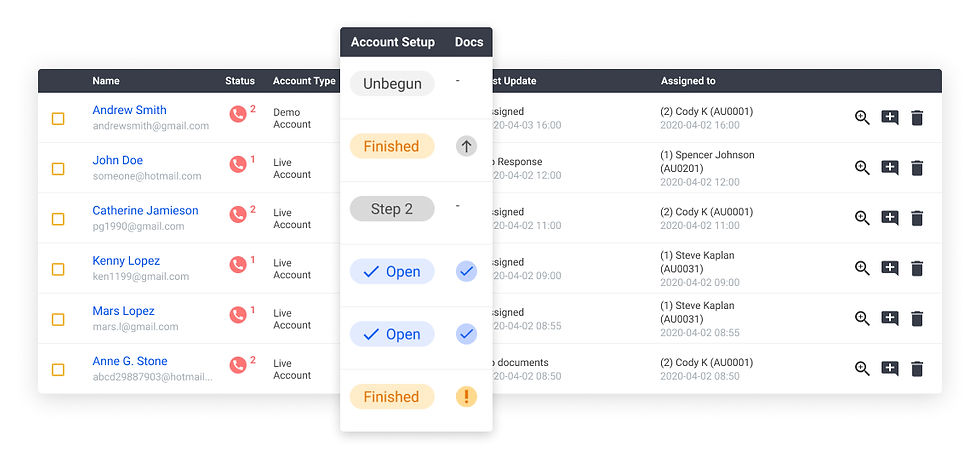
3. Show last updates and comments in the table to track the progress


Initiate data collection to measure the result: Utilization, Efficiency, Conversion
To measure the success of the leads system, I initiated the data collection project, persuaded and worked with developers to design and iterate the metrics and the data collection methods.
1. Start with a basic, experimental MVP
We didn't jump into building a beautiful dashboard right away. Instead, we started with experiments.
We analyze and play with the data. Can we find a pattern or meaningful insight? Are the numbers reliable? Is there a flaw in the data definition and collection methods?

2. Iterate based on the findings (and issues)
In the process, we tackled issues including outliers coming from exceptions and mismatches between the new and the old data structure. In order to study, clean, and solve problems in the data more conveniently, we also turned the analytic tool from a formatted web report into a tool to export raw data for us to work in Excel.
Data Result:
Significant improvements in Leads Utilization, Workflow Efficiency, and the usage of tracking functions
comparing the 2 months before and after the launch.
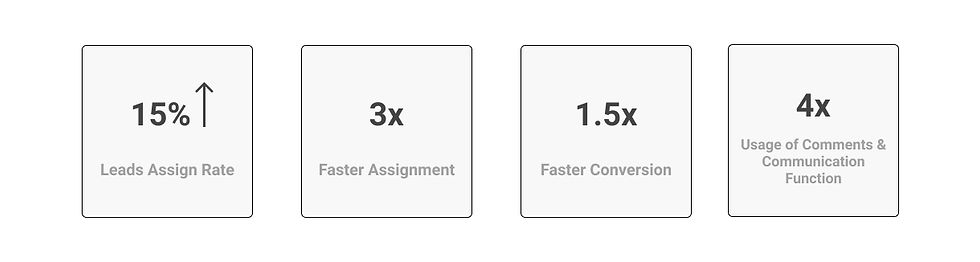
Leads assign rate rose from 48.6% to 65%
New leads were assigned within an average of 1.4 days compared to 4.8 days before
Conversions of all non-referral leads took an average of 2.2 hours instead of 3.5 hours
The number of comments and communication records largely increased
A change in users' behavior
A week after the release, we were happy to find that salespeople started to make plenty of comments and communication notes in the system to aid the leads-acquiring progress.
"It's amazing to see real-time comments flooding into the system after the redesign. " - A Co-working Developer
"Comment" and "Communication" were 2 rarely used functions since developed upon the sales team's request a long time ago. After redesign and being combined with the "latest update" feature, these functions finally revived and came in handy for salespeople.
Feedback from the Dev team:
"Looking at the data and charts, it's the first time I feel that all my effort is meaningful and is paying back ever since I worked on this system. Thanks for visualizing the impact for us." - A Co-working Developer
When showing the data result to our Dev team, I received exciting feedback. It's the most rewarding moment for me.
Side Story - Challenge:
Remote + cross-continent communication gap + new to the company
The way I tackle the challenges:
Live with ambiguity, make assumptions (and let the stakeholders know about the assumptions) and start with draft ideas/sketches that I can share with them to generate more thoughts and dig out more details.
Never give up to reach the busy stakeholders ( =users in this case) from the other continent to set up video interviews, walk through the tasks, and test the interactive prototype in order to understand the real-life context and user story behind the brief. I was able to rewrite my assumptions, make huge modifications in my design, and provide a high-performance solution that hits the spot.

留言